
Screenshots
App details
- Updated
- May 5, 2003
- Language
- English
- Category
- Mobile
SoftPas in:
This product is also available in the following languages:
About Clony XXL
Download Clony XXL – CD copying, CloneCD, protected CD, utility tool, disc duplication, CD protection analysis
Overview
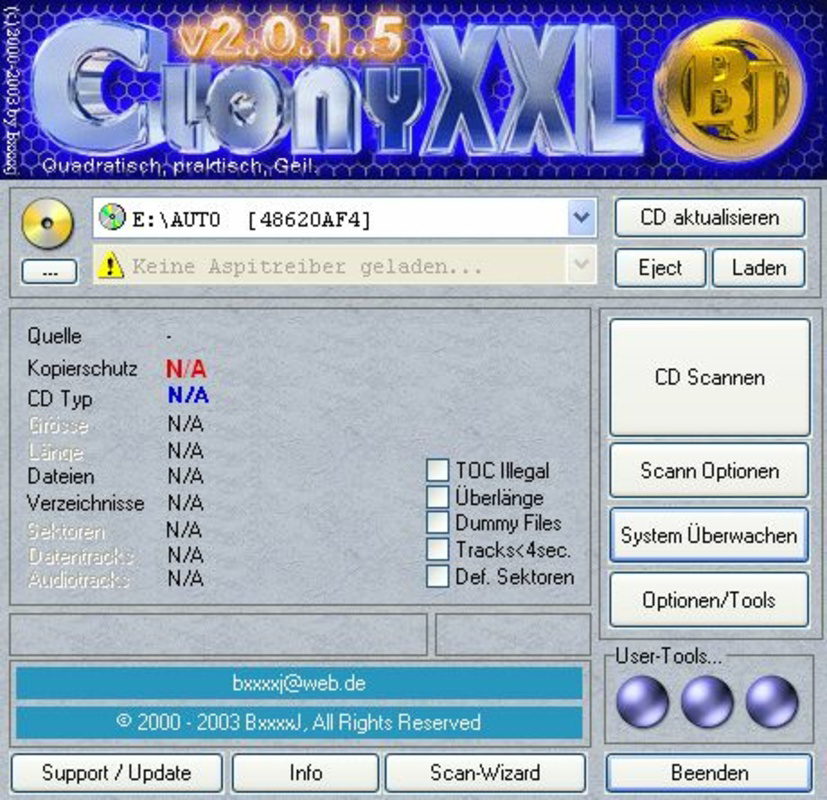
Clony XXL is a utility tool designed to enhance the CD copying experience, particularly for users working with CloneCD. Its primary purpose is to streamline the process of duplicating protected CDs by analyzing the copy protection mechanisms in place. This functionality helps users identify the type of protection present before initiating the duplication process, enabling better preparation and reducing the likelihood of failed burns. The app is especially valuable for enthusiasts and collectors who maintain large CD libraries, including music, software, and game discs, many of which employ various forms of digital rights management (DRM).
Target users include hobbyists, archivists, and retro computing enthusiasts who rely on CloneCD for disc preservation and duplication. While the developer, Clony, did not provide additional background details, the app’s long-standing presence in the niche utility space suggests a dedicated focus on CD-related tools. Real-world use cases include preserving rare or aging media, backing up game discs, and archiving software that may no longer be available through official channels. In the broader app ecosystem, Clony XXL fills a specialized role that remains relevant despite the decline of physical media, offering a targeted solution for a specific technical challenge.
Key Features & Functionality
- Protection Analysis: Clony XXL scans a CD to detect and identify the type of copy protection in use. This feature provides users with immediate feedback on potential obstacles, allowing them to adjust their approach before starting the duplication process.
- Seamless CloneCD Integration: After analysis, the tool automatically launches CloneCD with pre-configured settings optimized for the detected protection. This eliminates the need for manual configuration, reducing user error and saving time.
- High Speed Efficiency: The application processes CD protection data rapidly, delivering results in seconds. This speed ensures minimal downtime between analysis and burning, supporting efficient workflows.
- Wide Compatibility: Clony XXL supports a broad range of protected CDs, including those from music, software, and gaming titles. This versatility makes it suitable for users with diverse disc collections.
- User-Friendly Interface: The tool features an intuitive layout that is accessible to both beginners and advanced users. Simple navigation and clear output reduce the learning curve and enhance usability.
For example, a user attempting to back up a protected game disc can insert the CD, launch Clony XXL, and receive an instant report on the protection type. The tool then triggers CloneCD with the correct settings, allowing the user to proceed with the duplication without further intervention. This workflow is particularly beneficial in batch operations, where consistency and speed are critical.
Interface, UX & Performance
Clony XXL presents a clean, minimalistic interface focused on core functionality. The layout prioritizes readability and ease of use, with clearly labeled buttons and straightforward output messages. Navigation is linear: insert CD, initiate analysis, review results, and proceed to CloneCD. This flow ensures that users can complete the process with minimal cognitive load.
Although the developer did not list formal performance metrics, the application operates quickly and responsively on supported systems. Users report smooth operation during CD analysis and prompt triggering of CloneCD. The tool does not appear to consume significant system resources, which is essential for maintaining system stability during disc duplication tasks.
Performance across different device categories remains consistent due to its lightweight design and compatibility with older Windows systems. Stability is maintained through a focused feature set and minimal background processes. The application remains responsive even when handling complex protection schemes, ensuring a reliable user experience.
Platform Compatibility & Technical Requirements
Clony XXL is designed for the Windows platform and is compatible with various versions of the operating system. The application has a file size of 1.0 MB, making it lightweight and suitable for systems with limited storage. The software version is 1.10, released on May 5, 2003, indicating its status as a legacy tool developed during the peak of CD-based media.
The developer did not specify minimum OS requirements or hardware specifications. However, given its age and small size, it is likely compatible with older Windows systems such as Windows 98, ME, and XP. Compatibility with modern Windows versions (e.g., Windows 10 or 11) may require compatibility mode or third-party emulation tools, though this was not confirmed by the developer.
Pros and Cons
Pros
- Efficient CD protection analysis with instant feedback
- Seamless integration with CloneCD reduces manual setup
- Lightweight design with minimal system resource usage
- Supports a wide range of protected CDs, enhancing versatility
- Simple, intuitive interface suitable for users of all skill levels
Cons
- Only available for Windows, limiting cross-platform use
- Released in 2003; may lack support for modern operating systems
- Developer did not provide detailed technical requirements
- No built-in update mechanism; users must manually seek newer versions
- Not available on mobile platforms such as Android or iOS
FAQ
Is Clony XXL safe to download and use?
Yes, Clony XXL is a legitimate utility tool that has been used by CD duplication communities for years. As with any software, users should download from trusted sources to avoid modified or malicious versions.
Can I use Clony XXL on modern Windows systems?
While the app was released in 2003, it may still function on modern Windows systems when run in compatibility mode. However, official support or guaranteed performance on newer OS versions was not provided by the developer.
Does Clony XXL work with all protected CDs?
Clony XXL is compatible with a wide variety of protected CDs, particularly those targeted by CloneCD. However, it may not support every protection scheme, especially those introduced after its release.
Is Clony XXL free to use?
Yes, Clony XXL is available at no cost. The software is distributed as freeware, with no licensing fees or subscription models.
Can I install Clony XXL on my Android or iOS device?
No, Clony XXL is designed exclusively for Windows and is not available for mobile platforms such as Android or iOS.
Final Thoughts + CTA
Clony XXL remains a reliable and efficient utility for users engaged in CD duplication, particularly those relying on CloneCD for protected disc handling. Its ability to quickly analyze protection schemes and integrate seamlessly with CloneCD offers a significant time-saving advantage. While the app is outdated by modern standards, its lightweight design and focused functionality continue to serve niche users in the retro computing and media preservation communities.
For enthusiasts preserving legacy software, games, or music collections, Clony XXL delivers tangible value. Its simplicity, speed, and compatibility with a broad range of discs make it a practical choice despite its age. The lack of updates and mobile support are notable limitations, but the app’s core purpose remains intact.
Download Clony XXL now
Guides & Tutorials
How to install Clony XXL
- Click the Download button above.
- Once redirected, accept the terms and click Install.
- Wait for the Clony XXL download to finish on your device.
How to use Clony XXL
This software is primarily used for its core features described above. Open the app after installation to explore its capabilities.
User Reviews
No reviews yet. Be the first to share your experience.
You may also like
more
Que no te pillen¡
About !Que no te pillen¡Reviewed by Jason A. BilbreyShow MoreShow Less

3D Combat Zone
About 3D Combat ZoneOriginally released in 1983, 3D Combat Zone immerses players...

666: El día del portal
About 666: El día del portalOn June 6, 2006, Agent P. Stone uncovers a sinister...

80 in 1 Best Flash games
About 80 in 1 Best Flash games 80 in 1 Best Flash games is a collection of 80 fl...

ABYSS SEEKERーーWhat Do You See Deep in The Abyss
About ABYSS SEEKERーーWhat Do You See Deep in The AbyssIn ABYSS SEEKER, players...

ACA NEOGEO THE KING OF FIGHTERS 2002 for Windows
About ACA NEOGEO THE KING OF FIGHTERS 2002 for WindowsTHE KING OF FIGHTERS 2002,...